
To get help with an order from MLBShop.com in the United States, open the MLB Shop Help Desk. Choose order tracking or returns for a routine request. If the order page cannot answer your question, use the chat option from Contact Us. Have the order confirmation handy so you can match the problem to the right purchase and storefront.
Contact the store that took your order
A Dodgers cap can turn up on MLBShop.com, in a ballpark, and at another retailer. Start with the seller named on the email or receipt. For an online purchase, compare the order confirmation with the store domain you actually used. Keep the confirmation open in a private tab so you can look up the purchase. A search result for the team name often leads to a general store or league page, which can make an easy tracking problem take several handoffs.
| What your receipt shows | Where to start |
|---|---|
| MLBShop.com merchandise order | Use the U.S. Help Desk for tracking, returns or chat. |
| MLB Shop Europe order | Start at the European Help Desk and open the tools for that order. |
| Purchase from a stadium shop or another retailer | Follow the contact or return details on that seller’s receipt or order page. |
| Ticket or streaming charge | Use the ticket seller, club, or subscription provider named on the receipt. |
Match the storefront even when the package went across a border. A shipping address in Europe gives you the destination. The confirmation gives you the store and order record. MLBShop.com and MLB Shop Europe publish their own terms and help pages. A shopper who ordered on the U.S. site for a relative abroad should start with the contact route in the U.S. order confirmation. A shopper with a Europe order should start with the European store. U.S. site terms and European store terms.
Find chat, phone or email for that storefront
The U.S. contact page describes a chatbot with the option of a live representative when needed. Open the chat button on the help page or the chat bubble when it appears. Start with the closest issue, such as tracking or returns, then explain what the order page still leaves unresolved. If you need a person to review the details, ask for that handoff in the chat. The page also shows a postal contact option. The experience depends on the route available when you visit. MLBShop.com Contact Us.
If you are looking for an MLB Shop phone number, email address or service hours, read the contact information for the store on your receipt. The U.S. site terms list a Fan Services number for visitors having difficulty accessing the site or its terms. Use that route for the accessibility purpose it describes. For ordinary U.S. merchandise requests, the current contact page points to chat and mail. MLB Shop Europe’s terms identify a phone and email for that storefront’s orders. Check its current contact details and the hours shown for the channel you choose. U.S. accessibility contact and MLB Shop Europe customer service details.
If you have more than one order open, match the item to its confirmation before starting a chat. Two orders under the same email can have different order numbers, return timelines and tracking records. That one check gives support a specific purchase to look up and gives you a reference to use if the case takes more than one conversation.
Look up each item and package
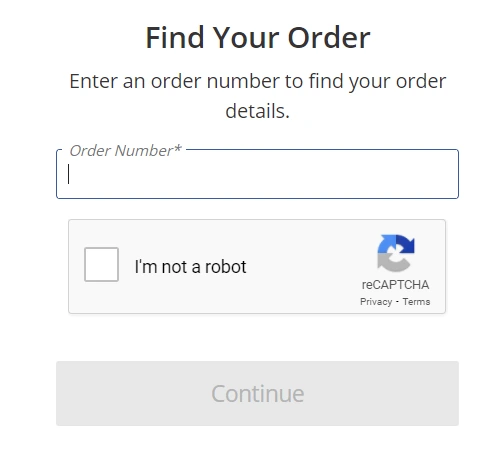
Open Find Your Order to see the retailer’s order record. For a purchase made while signed in, you can also open Order History from your account and choose the matching order. Start from the date and items you recognize. The retailer’s page can tell you which items are processing, which have shipped and which tracking numbers go with them. Once a shipment is moving, the carrier’s link can add a last scan, a delivery estimate or a delivery photo when available. MLB Shop’s order status help.
Keep the order and shipment records together if a deadline matters. Say you bought a cap and a jersey for a Saturday night game but are traveling Friday. One package arriving Saturday may mean the delivery estimate was accurate and you still missed your chance to pack it. Confirm the event on the MLB schedule, then compare your departure with the estimate for the item you actually need.
Find an order placed as a guest
On the U.S. guest lookup, enter the order number from the confirmation and the email address used for billing. Select Find Order and complete any verification shown. An order number represents the purchase. A carrier tracking number represents a shipment, so keep each number in its proper field. The form also explains that purchases made while signed out do not appear in account order history. Creating an account later may therefore leave you looking at an empty history even though you have the details needed to locate the purchase. Official order lookup.
If you cannot find the confirmation, search the inboxes you could have used at checkout, including filtered mail. Search for the storefront name and check the approximate purchase date and any later shipping messages. For a gift someone else ordered, ask them to check the confirmation or take the first step through their own account. If you still have neither the confirmation nor the order number, the store directs you to customer service. Tell them the approximate order date and that the confirmation is missing so they can tell you what they need to find it. Help with a missing confirmation.
Follow up when a package is missing
Suppose a box contains a cap but the jersey from the same purchase is absent. Check the retailer’s entry for the jersey and look for a second shipment confirmation. An order can be split, particularly when its items have different processing times. A recently issued shipment number can also take time to produce carrier updates. Save the tracking number for the specific box and confirm which items the retailer assigned to it before reporting an incomplete shipment. MLB Shop carrier tracking guidance.
For a package marked delivered, read the latest scan and check any proof of delivery against the delivery location. Look around the mailbox or door and check a front desk, leasing office or mailroom if you use one. The retailer’s lost-order instructions describe when to wait for a scan to catch up and when to report the problem. Open the guidance that applies to your order and report lost packages or missing items promptly. The U.S. order inquiries page lists a reporting limit of 45 days from the order’s ship date for those cases. Keep the original estimate, latest carrier event and order number together for your message. U.S. lost order and missing item instructions.
Start a return and follow the refund
Open your purchase in the order portal and select the return or exchange option for the exact item. MLBShop.com’s U.S. return policy requires eligible products to be unworn and carry their original tags and labels. An item can have its own eligibility and timeline even when you bought it in the same order as another product. Open each item before packing everything together. If the portal supplies more than one label, check which product each label goes with. Different items can go to different facilities. U.S. returns and exchanges policy.
Compare the method and refund option the portal offers. Where available, a Happy Returns drop-off uses a QR code, and a UPS return can use a printable label. The store says a refund to the original payment method can carry a return fee of up to $9.99 when you use its return label or QR code, with an exception when the return is due to the store’s error. Read that amount and the refund destination before you confirm. If the portal also offers store credit, think about whether you plan to make another purchase before choosing it. The selected refund method is final under the current policy. Return methods and fees.
Keep the drop-off receipt and check the progress in sequence. First look for a carrier scan or drop-off confirmation. Then look for delivery to the return destination or a store notice that the refund was initiated. Finally check the payment method or email address chosen for the refund. The U.S. policy gives a posting estimate of two to seven business days after the retailer receives an item returned with its UPS label. The QR-code option lists a different initiation timeline. If the applicable time has passed, give support the return tracking number, delivery date and confirmation email if you have it. That shows which step is still open. Refund timing by return method and payment help.
Check the return terms for the exact item
The U.S. policy describes a 100-day period for most eligible items, and a shorter window may apply to items shipped by a Trusted Partner. It excludes customized and personalized items and clearance or final-sale products from ordinary returns. Check the specific item and current deadline in the portal before committing to return postage. An exchange may appear for a qualifying order when you want the identical item in a different size. For other orders, an eligible return can let you buy the preferred version separately. Compare the replacement stock and the timing if you need the new size for a particular game. Eligibility and exchange terms.
Report a damaged, defective or incorrect item through the applicable order help. For example, if your confirmation has a personalized number that differs from the product you received, keep the wrapping and photograph the product detail you are reporting. Explain the mismatch with the confirmation when you contact the retailer. The U.S. policy says to report defective, damaged or wrong merchandise within 45 days of the ship date to be eligible for a no-cost replacement or refund. Ask what the seller needs to review your particular order and keep the item until you have those instructions. Help with a flawed item and U.S. return terms.
Send support a request they can act on
Start with the order number, the exact item and the result you want. Add the latest useful date, such as the last carrier scan or the day the return arrived. Keep the confirmation and any proof nearby so you can answer a follow-up without leaving chat to find it. Use the retailer’s official contact page to start the conversation. Share order details in that private channel and leave passwords, verification codes and full payment numbers out of the message.
I’m contacting you about order [number] for [seller and item]. I see [status and date] on the order or tracking page. I have already checked [specific step]. Could you [one action you want the store to take]? Please let me know the next step and the case number if one is available.
For a partial delivery, identify the missing item by name and size. Explain which products were in the box and how the order page shows the rest. You might ask the store to confirm whether the jersey was assigned to another shipment. If the order shows everything in the same box, ask how to report the missing item. That gives the agent a specific record to read and a clear question to answer. Save the outcome and any reference so you can pick up the same case if the promised update does not arrive.
For a return that still has no refund, lead with the method you selected and the carrier or drop-off evidence. Say when the return reached its destination, whether you received a refund notice and which original payment or store-credit option you selected. Ask the retailer to confirm whether it logged the return and initiated the refund. If it says the refund is already issued, ask for the date and destination so you can check the correct record. Keep the conversation and receipt until the transaction is resolved.
The same support handoff works for a store purchase when you use the right receipt. The MLB Flagship Store in New York publishes contact information and return terms for that location. A receipt from a team shop, ballpark kiosk or another retailer should take you to the seller identified there. If the issue is a ticket that will not appear on your phone, use the seller or club box office for the ticket order and the MLB Ballpark app guide for account and wallet steps. Official club ticketing support example.
For a streaming charge, check who billed the subscription. A direct MLB.TV subscription goes to MLB streaming support. A charge through another provider may need that provider’s billing support. Find the invoice and account email for the subscription before contacting anyone. The MLB.TV subscription guide can help you identify the account you used. Once you know which service took the payment, you can send the right purchase record with your first request.
Loading comments...