
The MLB Ballpark app is MLB's free official app for digital tickets and in-stadium planning. Use it to find a purchased ticket, display the secure barcode at the gate, send a ticket to a friend, check a ballpark map, and review venue information. It is available for supported iPhone and Android devices.
Ballpark is not the same product as the general MLB app, and it is not an MLB.TV subscription. It will not unlock every live game for free. If your goal is scores, audio, video, or alerts away from the stadium, compare those choices in our guide to the best MLB apps. If you have a ticket to an in-person game, the steps below will help you get it ready before you reach the gate.
What the MLB Ballpark App Does
MLB describes Ballpark as an all-in-one gameday companion. Its central job is mobile ticketing: tickets connected to a verified email can appear under Home or Tickets, where the holder can open, manage, or forward them. The official app also supports team schedules, interactive stadium maps, parking and gate information, notifications, check-ins, promotions, and a history of games attended. Some features, including food ordering, loyalty programs, and hands-free Go-Ahead Entry, are available only at participating venues.
The app and an MLB account are free. Tickets, parking, concessions, merchandise, and other purchases are not. Ballpark also does not create tickets purchased under an unrelated account; it displays inventory after the correct purchase or transfer email has been linked and verified.
How to Download the Official MLB Ballpark App
Start at MLB's official Ballpark page or search the Apple App Store or Google Play for “MLB Ballpark.” On Google Play, confirm that the developer is MLB Advanced Media, L.P. and that the application ID is com.bamnetworks.mobile.android.ballpark. Do not install a third-party APK, modded package, or a site that asks for your MLB password before directing you to an app store.
MLB's 2026 support information lists Android 11 through Android 16. For Apple devices, it lists iOS 18 or later on an iPhone XS, XR, second-generation SE, or newer. Those requirements can change with an app update, so check the current store listing before relying on an older phone. If your device is not supported, contact the home club's ticket office before game day and ask what accessibility or ticket-presentation option it provides.
Install updates while you have a reliable connection, then open the app and complete login before leaving home. That small test is more useful than discovering an operating-system or password problem while standing in the entry line.
How to Sign In and Verify Your MLB Account
Open Ballpark and sign in with an existing MLB account, or create one in the app. MLB introduced stronger account security for the 2026 season: after entering your email and password, you may be asked for a six-digit code sent to your email. During enrollment, MLB can also ask you to add a mobile number so future verification can use email or text.
Keep these three account layers separate:
- MLB account: the identity used to enter the Ballpark app.
- Verified MLB account email: an address you prove you own so Ballpark can associate tickets purchased or received at that address.
- Club or ticket-vendor account: the inventory account behind a team's tickets, sometimes operated through Ticketmaster or Tickets.com. Some clubs ask for this login after you open an event card.
To connect a ticket email, open Profile and choose MLB Account Emails. Add the exact address used to buy or receive the ticket, request the verification message, then use the one-time link in that inbox. Return to Ballpark and refresh. You can verify more than one address, which is useful if your MLB login and purchase email differ.
Never send another person your password or six-digit verification code. If you cannot remember the password, use “Forgot Password?” in the official app. A website, seller, or support contact can ask which email or order is affected, but it does not need your password to locate a ticketing problem.
How to Find and Use Tickets in the Ballpark App
After the purchase or transfer email is verified, go to Tickets and open Wallet. Choose the event card for your game. The current Ballpark interface may show the next five events first, with “View All” for additional dates. On game day, the same event may also appear on Home.
- Confirm that the game, date, team, section, row, and seat are correct.
- Open the event card and complete any club or ticket-vendor login it requests.
- Select the individual ticket to open its scan view or rotating barcode.
- Swipe to the next ticket if everyone in your party is entering together, or forward each person a separate ticket before arrival.
- At the gate, present the live ticket on the phone and follow the attendant's instructions.
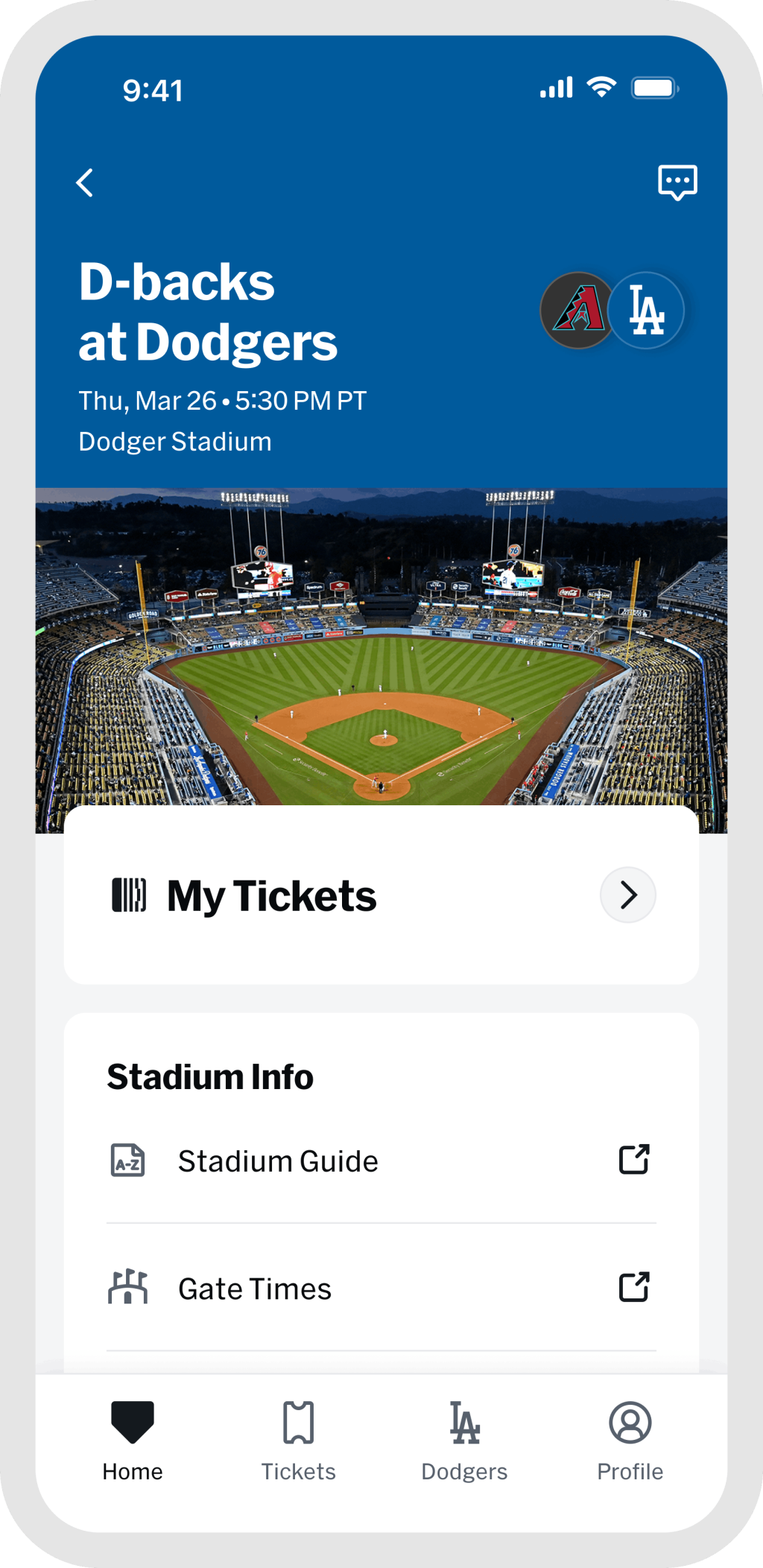
Many MLB tickets use a barcode that continually changes to reduce copying and fraud. A screenshot can freeze the wrong barcode and may be rejected. Use the live ticket or an officially supported wallet option shown for that ticket; availability differs by club and device. Before scanning, raise the screen brightness and have the ticket already open.
Use the MLB games today page to confirm the scheduled start time, but rely on the ticket and club notices for gate, parking, and venue instructions. For planning farther ahead, the complete MLB schedule can help you check the matchup and date.
How to Forward or Receive MLB Tickets
Sending a ticket
Open Tickets, choose Wallet and the correct event, then select the ticket or tickets you want to forward. Depending on the club's system, the control may say “Forward,” “Forward Tickets,” or “Transfer.” Send through the recipient's email, a saved contact, or the official share-link option. A share link works like a key to that ticket, so send it privately to one intended recipient.
Check the transfer status afterward. A pending transfer can often be canceled and sent again if you entered the wrong address. Some systems can also recall an accepted ticket, but eligibility and deadlines vary. If no transfer button appears, the particular ticket may not be eligible; the club's box office is the right place to confirm.
Receiving a ticket
Open the official email or text from the sender and choose Accept. Sign in or create the requested account, verify the receiving email if prompted, then return to Ballpark and refresh Wallet. Confirm that the status says accepted and that you can open the event card. Do this well before your group separates—an unaccepted invitation is not yet a ready gate ticket.
Never ask the sender to replace an official transfer with a screenshot. If a seller supplied only an image, request a genuine digital transfer through the original ticket platform or contact that seller's customer service.
Why Tickets Are Not Showing—and How to Fix It
A blank Wallet usually points to an account association problem, not a lost order. Work through this sequence:
- Check the order or transfer email. Confirm the home team, event date, and exact email address used.
- Check MLB Account Emails. Add that exact address and complete its verification link.
- Accept the transfer. If someone sent the ticket, make sure you completed the invitation rather than only opening the message. Ask whether the sender canceled or recalled it.
- Open the correct club. Select the team connected to the event, then complete any separate Ticketmaster, Tickets.com, or club-account login.
- Refresh Wallet. Pull down on the ticket screen. Some vendor transfers take a few minutes to publish after acceptance.
- Update and reconnect. Install the current app version, switch to a reliable connection, and sign out and back in only after confirming you know the password and can receive the MFA code.
If the event appears but the barcode does not, check whether the ticket was forwarded, recalled, sold, or not yet released for display. Barcode timing and restrictions belong to the club or ticket provider. Do not try to repair the problem with a downloaded APK or somebody else's login.
Keep the purchase confirmation, order number, affected email, and a description of the error available for support. Hide payment details, passwords, and verification codes from screenshots you send.
MLB Ballpark App Support: Who to Contact
| Problem | Best first contact |
|---|---|
| How to find, forward, accept, or recall a ticket | Ballpark Digital Assistant from the chat icon in Home or Tickets |
| Ticket inventory, email verification, missing barcode, or entry today | Home club's box office or ticket services |
| MLB account login or app technical issue | Official MLB Help Center or Customer Support inside Profile |
| Third-party purchase not transferred correctly | The original seller or resale platform's support team |
The Digital Assistant gives step-by-step ticketing help and is reached through the chat icon near the top of Home or Tickets. For an inventory or gate problem, MLB's club FAQs consistently direct fans to the team box office because that team can see its own ticket account and presentation rules. There is no single club phone number that covers every MLB ballpark.
Tell support the club, event date, order number, purchasing email, device model, operating system, and app version. Never give an agent your password or one-time MFA code. If first pitch is near and the ticket still cannot be presented, go to the venue box office with identification and the purchase confirmation.
Can You Access MLB Tickets Without the Ballpark App?
Sometimes you can accept or manage a forwarded ticket in a standard web browser, but that does not guarantee the browser page, a printout, or a screenshot can be used for entry. Several club FAQs say a fan without a supported iPhone or Android device can accept a forward online, then must contact that club's Fan Services or box office for the next step.
The safe answer therefore depends on the home club, ballpark, ticket type, and vendor. If you do not own a supported phone, your screen is damaged, or the battery has failed, contact the home club before traveling. Ask how it will verify your order and present the ticket. Do not assume another team's policy applies, and do not rely on print-at-home or a static barcode unless the club explicitly authorizes it.
MLB Ballpark App Game-Day Checklist
- Update Ballpark and confirm that your phone meets the current operating-system requirement.
- Sign in, complete MFA, and verify every email connected to the tickets.
- Open each event card and live ticket at least once on a reliable connection.
- Confirm all transfers show as accepted and each person knows which phone holds each ticket.
- Charge the phone and bring a battery pack if you will be away from power.
- Check the app's club section for current parking, bag, gate, weather, and venue notices.
- Arrive early enough to visit the box office if a barcode fails.
For tomorrow's plan, check the next day's MLB schedule. If you need to identify the home team or find its schedule page, use our list of all 30 MLB teams. Those pages confirm the baseball calendar; the club and Ballpark app remain the authority for your individual ticket.
MLB Ballpark App FAQ
Is the MLB Ballpark app free?
Yes. The official app download and an MLB account are free. Game tickets, parking, concessions, merchandise, and some venue services cost money.
Does the MLB Ballpark app work on Android?
Yes. MLB's 2026 FAQ lists Android 11 through 16, and the official app is on Google Play. Check the current store listing because supported operating systems can change.
Why does the app ask for another ticket-account login?
Your MLB account identifies you in Ballpark, while a club or vendor account controls the team's ticket inventory. A verified email helps connect the two, but some event cards still require a Ticketmaster, Tickets.com, or club login.
Can I use a screenshot of an MLB mobile ticket?
Do not depend on one. Many clubs use a rotating barcode and explicitly reject screenshots. Open the live ticket or use an official wallet option offered for that ticket.
Where is MLB Ballpark app customer service?
Use the Digital Assistant chat icon in Home or Tickets for guided ticket troubleshooting, or Customer Support in the app's Profile area for app/account help. Contact the home club's box office for missing inventory, barcode, or immediate entry problems.
Is MLB Ballpark the same as MLB.TV?
No. Ballpark is designed around tickets and the in-person stadium visit. MLB.TV is a live-game video product with its own eligibility, subscription, and blackout rules.
Loading comments...