
On DIRECTV, MLB Network is channel 213; satellite Extra Innings and streaming MLB.TV team channels are separate listings. Local-team games and national broadcasts also have their own channels, so the right place to watch depends on your DIRECTV service, location, package, and matchup.
This guide explains the channel numbers, the satellite-versus-streaming difference, and how to choose the right access without buying twice. Channel and product guidance was reviewed October 10, 2026. Use the current game schedule and your account lineup to confirm a specific telecast.
Where to find MLB channels on DIRECTV
MLB Network is channel 213. If you are searching for “MLB.TV on DIRECTV,” however, you may mean an out-of-market game package rather than MLB Network. DIRECTV's satellite Extra Innings listings and streaming MLB.TV team channels use different ranges. Start with the product you have, then locate the game.
MLB Network and national baseball channels
These are useful starting points for baseball coverage in DIRECTV's published lineup. Use your own account guide to verify inclusion and the event listing; a channel number alone does not guarantee that the current plan includes it.
| Channel or network | DIRECTV listing | What to check |
|---|---|---|
| MLB Network | 213 | Network programming and the games scheduled on that channel |
| ESPN | 206 | The broadcast assigned to ESPN, not a separate MLB.TV entitlement |
| FS1 | 219 | Whether the selected game airs here or on FOX |
| TBS | 247 | The listed baseball telecast |
| truTV | 246 | The actual event listing and your package |
| FOX and NBC | Local affiliate number | Station availability for your service address |
DIRECTV's channel guide is the place to confirm the lineup. For a particular matchup, first find its network in our MLB TV schedule, then look for that network in your DIRECTV guide. Searching only for the team name can return several listings, including a replay or an unavailable out-of-market feed.
Extra Innings and MLB.TV team-channel ranges
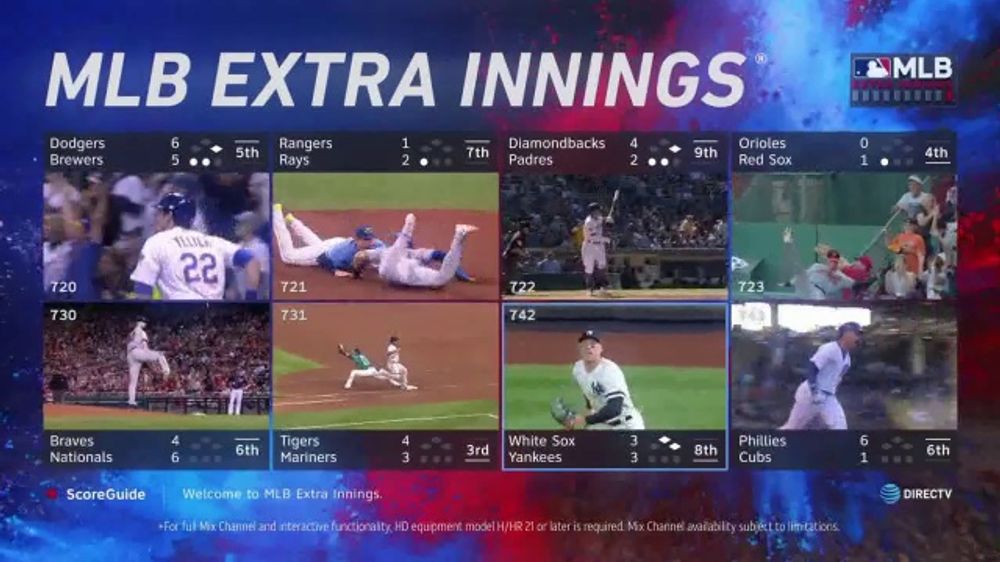
DIRECTV's satellite support identifies the Extra Innings area as 719–749, including Strike Zone on 719 and Game Mix on 720. Its separate MLB.TV support lists streaming team channels at 1250–1279. These are service-specific listings, not interchangeable directions for every DIRECTV viewer.
The satellite Game Mix is useful when you want to sample simultaneous games before choosing one. A streaming team-channel listing is a different way of locating that team's available games. Check the program title, start time, and access status instead of assuming a range means every channel is showing live baseball all day.
Older promotional screenshots can show historical channel numbers and interface designs. The cover illustration is an example of Extra Innings presentation, not today's complete guide. Your current service and account guide should decide where you tune.
DIRECTV satellite and streaming offer different baseball packages
DIRECTV offers the traditional MLB Extra Innings package to satellite customers. Its streaming customers have a separate MLB.TV add-on. The products overlap in their out-of-market purpose, but the delivery method and channel-guide presentation differ. Do not follow satellite channel instructions simply because a streaming subscription uses the same DIRECTV brand.
Satellite Extra Innings includes MLB.TV access that requires the appropriate authentication. That makes the package more than a group of receiver channels, but the included streaming benefit still has its own account connection. A satellite customer who wants baseball on a supported mobile or television app should check that connection before buying another MLB.TV subscription.
| Your DIRECTV service | Out-of-market baseball option | First place to check |
|---|---|---|
| Satellite | MLB Extra Innings, with included MLB.TV access | Receiver guide and the package shown on your account |
| Streaming | MLB.TV add-on through DIRECTV | Streaming account package details and team-channel listings |
| Either service, following local or national games | The relevant included channel or separate required service | Broadcast assignment and address-specific lineup |
This comparison tells you where to start, not which plan automatically carries every game. Separate the base television subscription from the out-of-market add-on and from any local-team channel. All three can matter during one season. You might use a local channel on Monday, a national broadcast on Tuesday, and an out-of-market feed for another team's game.
Before ordering, inspect the current account offer rather than an old advertisement. Determine the charge, renewal terms, cancellation rules, and whether another company already bills you for MLB.TV. Our MLB.TV subscription guide provides the wider product context; DIRECTV's own account screen supplies the terms attached to your proposed purchase.
If you already receive the games you want through your local network and national channels, an out-of-market package may solve a different problem from yours. Define the missing coverage first. That makes it easier to select a useful addition instead of paying for a package whose main purpose is following teams outside your home television territory.
Choose coverage for the games you actually follow
The most useful package depends on your physical viewing location and the broadcast assigned to a game. “My team is playing” is not enough information to choose the feed. Decide whether you need local coverage, an out-of-market regular-season game, or a national broadcast.
Your local team
Start with the team channel or regional sports network available at your service address. DIRECTV's March 2026 distribution announcement described new MLB-produced channels and service-specific numbers. For example, it listed the Reds at 661 for streaming and 661-2 for satellite, Detroit SportsNet at 663 and 663-3, and the Mariners at 687 on both.
These examples show why the service distinction matters; they do not promise access outside the clubs' home territories. Use DIRECTV's address or ZIP-code lineup check, then confirm your package. Old regional-network names may also be misleading after a distribution change, so search for the current team or channel label in your guide.
A local team's road game remains a local-team viewing question. The team's ballpark location that night does not automatically turn its broadcast into an eligible out-of-market game for you. Check the channel assigned to the matchup before trying an alternate feed.
An out-of-market team
If you live away from the team you follow, Extra Innings or MLB.TV may provide the regular-season coverage you are missing. A Yankees fan living outside the Yankees' local territory, for example, should investigate the applicable out-of-market package rather than assume a local-channel addition is necessary.
However, national exclusivity and local restrictions still apply. A package can cover many ordinary team broadcasts without covering every special event. Check the game listing and restriction message before deciding the account is broken.
If you follow several clubs, also consider where you want to watch: a satellite receiver, DIRECTV streaming interface, or supported MLB app. The same baseball goal can lead to a different purchase or authentication task depending on your existing service.
National games and the postseason
Follow the national broadcaster assigned to the game. DIRECTV's current 2026 postseason guide identifies TBS and truTV for American League Division and Championship Series coverage, FOX and FS1 for National League coverage, and FOX for the World Series. The postseason is not simply another night on an Extra Innings team feed.
Some events also have partner streaming options. An app appearing on a device does not prove that its paid content is included in your DIRECTV package. Verify the event's service and the entitlement required for it before subscribing.
For the current matchup, start with today's MLB games and follow the listed broadcaster. That approach stays useful after a series ends or a start time changes; a copied weekly game table does not.
Activate streaming access and avoid a second purchase
If your DIRECTV baseball package provides MLB.TV access, connect the accounts before trying to watch in a separate app. Provider authentication establishes the package entitlement; it does not automatically change every existing subscription billed by another company.
DIRECTV specifically warns that adding MLB.TV through its service does not replace an existing MLB.TV subscription. Review the old billing relationship before ordering. If you choose to replace it, manage that old subscription with the company that bills it, observing its cancellation and renewal terms.
Keep the purchase confirmation until you have verified the intended account and viewing device. A second purchase may temporarily seem like the fastest solution, but it can leave you with two bills while the original account mismatch remains unresolved.
Keep provider authentication separate from app sign-in
For eligible Extra Innings access, ESPN's current guidance points to MLB's Extra Innings authentication entry and the MLB app. Follow the official prompts using your intended MLB account and the DIRECTV account that owns the package. Then return to the MLB app and verify which account is signed in.
Do not apply direct ESPN-purchase linking instructions to an Extra Innings entitlement. ESPN states that Extra Innings accounts do not support that linking route. For other DIRECTV MLB.TV purchases, use the current DIRECTV support procedure matching the package on your account.
Once the package is authenticated, a television may still need its own app sign-in. Follow the instructions displayed on that device, whether they request credentials or a device-specific code. A successful sign-in means the device recognizes an account; it does not establish that a restricted game should play.
Our TV-provider activation guide explains account preparation and common failure points. If the provider rejects the package, begin with provider support. If the package is confirmed but the correct MLB account still sees a purchase prompt, describe that exact mismatch to MLB support.
What to check when a listed channel will not play
Read the error before changing the package. A channel can appear in a guide without being included in the account, while a properly included baseball package can still display a restricted game. An empty event channel, a blackout, and buffering also require different checks.
| What you see | First check | Useful next step |
|---|---|---|
| Purchase or authorization message | Package inclusion and correct account | Confirm the entitlement with the company that bills it |
| Blackout notice | Location and assigned broadcast | Look for the legal local or national feed |
| No game on the event listing | Date, start time, live versus replay | Read the current game schedule and guide description |
| Buffering or playback error | Device, app version, connection | Compare another included stream or supported device |
For satellite authorization errors, use DIRECTV's model-appropriate support instructions. Its 721 and 722 error guide explains package checks and service refresh. Follow that procedure for the actual error instead of applying receiver-reset instructions to a streaming app.
A blackout calls for a rights check. The game may belong on your local channel or a national network rather than the selected out-of-market feed. Our blackout guide explains why a subscription can be working correctly while one matchup remains restricted.
For an empty game listing, confirm whether the event has started, finished, moved, or appears under a different broadcaster. Do not infer cancellation from one blank channel. The guide's date and program description matter as much as its number, especially when several feeds or replays share a team name.
If an app freezes while other included programming works, focus on the app and device. Update supported software and check the connection before rebuilding account access. Give support the service type, device model, channel or game, and exact message. “Channel 213 fails on my satellite receiver” is a different report from “the MLB app asks me to buy after authentication,” and keeping those details clear helps avoid unnecessary account changes.
DIRECTV baseball questions before you subscribe
Does MLB Network include every MLB game?
No. MLB Network is one channel with its own programming schedule, rather than a full-league out-of-market package. If the game you want is assigned to FOX, TBS, a local team channel, or a separate streaming service, finding channel 213 does not replace access to that broadcast.
Before adding anything, identify several games you actually want to follow and check where they air. That small sample is more useful than counting every sports channel in a package. Ask which missing broadcasts the proposed addition would cover, then compare that answer with the channels you already receive.
Does Extra Innings include local games or the World Series?
Extra Innings is an out-of-market regular-season product with blackout restrictions. It is not a universal local-team or postseason pass. Your broader DIRECTV package may carry the required local or national broadcast, but that is a separate source of access from the Extra Innings feed.
For the 2026 World Series, check your FOX affiliate and the official broadcast options. For local games, verify your home-market team channel. For an ordinary out-of-market game, check the appropriate satellite Extra Innings or streaming MLB.TV listing. Match the task to the product before deciding whether an add-on is necessary.
Also inspect renewal terms before making a seasonal purchase. A baseball package that is helpful in April can have different value after the regular season has ended. Read the current offer and your renewal notice, and establish which company bills any existing streaming subscription.
The practical decision is simple: confirm your service type, locate the game's broadcaster, check address-specific inclusion, and then authenticate any streaming benefit you already own. Doing those checks in order turns “What channel is MLB on?” into an answer that fits the game and account in front of you.
Loading comments...